


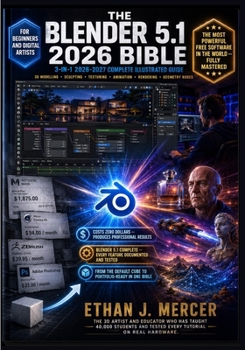
The Blender 5.1 2026 Bible: 3-in-1 Illustrated Guide to 3D Modelling, Sculpting, Texturing, Animation, Geometry Nodes, Lighting, Rendering and Composi

YOU OPENED BLENDER. STARED AT THE DEFAULT CUBE. AND HAD ABSOLUTELY NO IDEA WHAT TO DO WITH IT
You are not alone.
Every professional 3D artist working in Blender today started in exactly that spot.
Four thousand buttons menus panels and shortcuts you have never seen before.
Official documentation that assumes you already understand 3D concepts.
YouTube tutorials that are fragmented incomplete and never teach in a logical sequence.
And software so capable it feels impossible to know where to begin.
Here is the thing nobody tells you.
The difference between people who quit and people who become proficient is not talent.
It is having one structured guide that teaches features in the right order.
With real results at every step.
That guide is this Bible.
INTRODUCING THE BLENDER 5.1 2026 BIBLE.
THE COMPLETE 3-IN-1 GUIDE TO THE MOST POWERFUL FREE SOFTWARE IN THE WORLD.
Three complete books. One definitive volume.
Every tutorial tested on Blender 5.1 on Windows and macOS.
Every shortcut verified. Every node setup built and rendered.
Nothing theoretical. Everything real.
BOOK ONE -- STEP-BY-STEP TUTORIALS
Master mesh modelling modifiers and the complete Blender interface from day oneCreate photorealistic PBR materials with the Principled BSDF shaderUV unwrap any model and apply textures with precision and accuracyLight any scene with HDRI environments area lights and three-point setupsRender with both Cycles and EEVEE and know exactly when to use eachBOOK TWO -- REAL-WORLD WORKFLOWS
Model a low-poly character ready for game engine exportLight and render a commercial-quality product shot from scratchSculpt an organic creature head that rivals ZBrush outputBuild a walk cycle animation with keyframes and graph editor curvesComposite a 3D element seamlessly into a real photographBOOK THREE -- QUICK REFERENCE
Find any keyboard shortcut without stopping your workflowUse the essential node reference for materials lighting and compositingCompare Cycles and EEVEE render settings side by sideFix the most common Blender errors with one-line solutionsAccess the complete 3D glossary when terminology slows you downWHAT MAKES THIS DIFFERENT:
Covers Blender 5.1 completely -- Vulkan backend Geometry Nodes Cycles X and rebuilt Grease Pencil.
Teaches principles not just buttons -- ninety percent of this book stays accurate across future versions.
Written by an educator who has taught forty thousand students on real production hardware.
Every workflow is production-relevant -- the actual tasks freelance artists get paid to deliver.
Costs zero dollars to use. This book teaches you to use it at full professional capability.
THIS BOOK IS FOR YOU IF:
You just downloaded Blender and the interface feels completely alienYou have been watching tutorials for months without a structured foundationYou want to build a portfolio that gets you freelance work or a jobYou are a digital artist switching from paid software to the free alternativeYou want one complete reference that covers the entire Blender pipelineTHREE BOOKS. ONE PIPELINE. ZERO DOLLARS FOR THE SOFTWARE.
Photoshop costs twenty-two dollars a month.
Maya costs eighteen hundred and seventy-five dollars a year.
Blender costs nothing.
And the entire 3D industry has accepted that it matches or exceeds both.
Delete the default cube.
Open this Bible.
Start making something professional.
ETHAN J. MERCER -- 3D Artist and Blender Educator
2026-2027 EDITION -- Blender 5.1 Fully Documented
Customer Reviews
ThriftBooks ® and the ThriftBooks ® logo are registered trademarks of Thrift Books Global, LLC
