


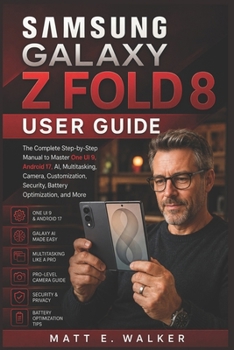
Samsung Galaxy Z Fold 8 User Guide: The Complete Step-by-Step Manual to Master One UI 9, Android 17, AI, Multitasking, Camera, Customization, Security
No Customer Reviews

You bought the Galaxy Z Fold 8. Now it's time to actually use it like one.
The Galaxy Z Fold 8 isn't just a phone that folds in half. With its wide cover screen, expansive inner display, One UI 9, Android 17, Galaxy AI, powerful multitasking tools, advanced camera features, and productivity-focused design, there's a lot more hiding inside this device than the basics you see on day one.
And honestly, you shouldn't have to spend hours digging through menus just to figure out what your phone can do.
That's exactly what this guide is for.
Whether you're completely new to foldable phones or upgrading from an earlier Galaxy Z Fold, this book takes you beyond simply knowing where the buttons are. It shows you how to turn the Fold 8 into a device that works around the way you communicate, work, create, travel, and stay entertained.
Inside, you'll discover how to: Set up your Galaxy Z Fold 8 from scratch and get the important settings right from the beginningTransfer your contacts, photos, messages, apps, and other data from your old phoneUnderstand the cover display and expansive inner display and know when to use each oneNavigate One UI 9 and Android 17 without feeling lost in menusMake the most of the Fold 8's unique foldable designUnlock the practical side of Galaxy AI, including writing assistance, translation, summaries, intelligent search, and moreUse Live Translate to make conversations across languages easierExplore AI-powered photo editing and remove unwanted objects or improve your imagesMaster multitasking, Split Screen, floating windows, App Pairs, and drag-and-drop workflowsCustomize your home screen, apps, controls, and overall experienceGet more from the camera and capture better photos and videosManage Wi-Fi, mobile data, SIM/eSIM, Bluetooth, and connectivityCharge your phone properly and use Wireless Charging and Wireless PowerShareImprove battery life and develop better battery-care habitsStrengthen your security and privacyKeep your software and apps updatedTroubleshoot common problems instead of immediately reaching for technical supportThe guide also includes practical tips for turning the Fold 8 into something closer to a pocket-sized productivity workstation, using the Taskbar, App Pairs, Split Screen, and its large inner display to work across multiple apps more efficiently.
But this isn't a book you'll need to read from cover to cover.
You can jump straight to what you need.
Trying to set up your phone? Start there.
Want to finally understand Galaxy AI? Go straight to the AI sections.
Need to figure out multitasking? Open the relevant chapter and follow along.
Want better photos? Head to the camera and editing sections.
Having trouble with charging, connectivity, or another feature? Use the practical instructions and troubleshooting guidance.
The goal is simple: less frustration, fewer confusing menus, and more confidence every time you pick up your Fold 8.
Whether you're using it for work, communication, photography, entertainment, travel, or everyday life, this guide helps you get past the learning curve and start taking advantage of what makes the Galaxy Z Fold 8 different.
Stop using your Fold 8 like an ordinary smartphone.
Open it up. Explore what it can really do. And make the most of every screen.
The Galaxy Z Fold 8 isn't just a phone that folds in half. With its wide cover screen, expansive inner display, One UI 9, Android 17, Galaxy AI, powerful multitasking tools, advanced camera features, and productivity-focused design, there's a lot more hiding inside this device than the basics you see on day one.
And honestly, you shouldn't have to spend hours digging through menus just to figure out what your phone can do.
That's exactly what this guide is for.
Whether you're completely new to foldable phones or upgrading from an earlier Galaxy Z Fold, this book takes you beyond simply knowing where the buttons are. It shows you how to turn the Fold 8 into a device that works around the way you communicate, work, create, travel, and stay entertained.
Inside, you'll discover how to: Set up your Galaxy Z Fold 8 from scratch and get the important settings right from the beginningTransfer your contacts, photos, messages, apps, and other data from your old phoneUnderstand the cover display and expansive inner display and know when to use each oneNavigate One UI 9 and Android 17 without feeling lost in menusMake the most of the Fold 8's unique foldable designUnlock the practical side of Galaxy AI, including writing assistance, translation, summaries, intelligent search, and moreUse Live Translate to make conversations across languages easierExplore AI-powered photo editing and remove unwanted objects or improve your imagesMaster multitasking, Split Screen, floating windows, App Pairs, and drag-and-drop workflowsCustomize your home screen, apps, controls, and overall experienceGet more from the camera and capture better photos and videosManage Wi-Fi, mobile data, SIM/eSIM, Bluetooth, and connectivityCharge your phone properly and use Wireless Charging and Wireless PowerShareImprove battery life and develop better battery-care habitsStrengthen your security and privacyKeep your software and apps updatedTroubleshoot common problems instead of immediately reaching for technical supportThe guide also includes practical tips for turning the Fold 8 into something closer to a pocket-sized productivity workstation, using the Taskbar, App Pairs, Split Screen, and its large inner display to work across multiple apps more efficiently.
But this isn't a book you'll need to read from cover to cover.
You can jump straight to what you need.
Trying to set up your phone? Start there.
Want to finally understand Galaxy AI? Go straight to the AI sections.
Need to figure out multitasking? Open the relevant chapter and follow along.
Want better photos? Head to the camera and editing sections.
Having trouble with charging, connectivity, or another feature? Use the practical instructions and troubleshooting guidance.
The goal is simple: less frustration, fewer confusing menus, and more confidence every time you pick up your Fold 8.
Whether you're using it for work, communication, photography, entertainment, travel, or everyday life, this guide helps you get past the learning curve and start taking advantage of what makes the Galaxy Z Fold 8 different.
Stop using your Fold 8 like an ordinary smartphone.
Open it up. Explore what it can really do. And make the most of every screen.
Format:Paperback
Language:English
ISBN:B0HCL2S4JP
ISBN13:9798190290806
Release Date:August 2026
Publisher:Independently Published
Length:222 Pages
Weight:0.60 lbs.
Dimensions:0.6" x 6.0" x 9.0"
Customer Reviews
0 rating
Copyright © 2026 Thriftbooks.com
Terms of Use | Privacy Policy | Do Not Sell/Share My Personal Information | Cookie Policy | Cookie Preferences | Accessibility Statement
ThriftBooks ® and the ThriftBooks ® logo are registered trademarks of Thrift Books Global, LLC
ThriftBooks ® and the ThriftBooks ® logo are registered trademarks of Thrift Books Global, LLC
