


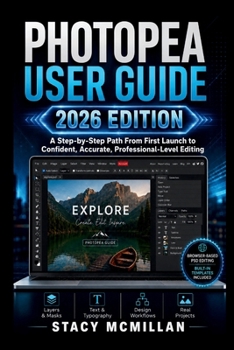
Photopea User Guide - 2026 Edition: A Step-by-Step Path From First Launch to Confident, Accurate, Professional-Level Editing
No Customer Reviews

Tired of guessing your way through layers, masks, tools, and export settings? Many beginners feel stuck when an editing workspace looks crowded. A simple task can become frustrating when you do not know which layer is active, why a tool is not working, how to save an editable file, how to use masks, or where built-in practice resources are found. Without a clear path, you may waste time clicking around and still end up with rough edits or the wrong final file. This practical guide gives you a step-by-step way to learn Photopea from the ground up. You will begin with the browser workspace, then move through files, layers, selections, masks, photo editing, text, effects, templates, workflow speed, troubleshooting, and safe file habits. Each part shows what to do, why it matters, what to avoid, and how to apply the skill in real projects. The book uses clear instructions, practical examples, helpful diagrams, visual guides, beginner checks, workflow tips, and troubleshooting support. It also pays close attention to Photopea's built-in tutorials, sample PSD files, templates, and asset resources, so you learn what is already inside the app before searching elsewhere.
This guide skips heavy theory and focuses on clear steps you can use right away. What's insideBeginner-friendly setup guidanceWorkspace and interface walkthroughFile opening, saving, importing, and exporting stepsLayers, groups, masks, and layer orderSelection tools and clean masking workflowPhoto cropping, resizing, correction, and retouchingText, fonts, typography, and layer stylesFilters, shadows, glows, and visual effectsShape, Pen Tool, brush, color, and fill guidanceSocial media graphics, mockups, and layout projectsBuilt-in tutorials, sample PSD files, and templatesShortcuts, actions, batch work, and workflow speedTroubleshooting for files, masks, loading, and lost workSafe habits for backups, clients, and publishing
Who's this guide for?Beginners opening Photopea for the first timeSelf-taught designers who need clearer structurePhoto editors learning safer correction habitsContent creators making social graphicsFreelancers handling client-ready filesStudents learning design and image editingSellers creating product images and promosUsers who want PSD editing in a browser
By the end of this guide, you will be able to: Open Photopea and understand the main workspaceCreate a new project with the right size and backgroundWork with layers, groups, masks, and adjustmentsUse selections and masks for cleaner editsCrop, resize, retouch, sharpen, and soften photosAdd readable text and apply controlled effectsUse shapes, brushes, fills, and simple illustration toolsBuild social media graphics, templates, and mockupsUse built-in PSD samples and templates with confidenceSave editable PSD files and export final designs properlyFix common file, layer, mask, and loading problems
If you want a clear, hands-on way to learn browser-based editing, this guide gives you the structure, steps, and practical support to build confidence while creating real files. Get your copy today and start editing cleaner, smarter, and with more control.
This guide skips heavy theory and focuses on clear steps you can use right away. What's insideBeginner-friendly setup guidanceWorkspace and interface walkthroughFile opening, saving, importing, and exporting stepsLayers, groups, masks, and layer orderSelection tools and clean masking workflowPhoto cropping, resizing, correction, and retouchingText, fonts, typography, and layer stylesFilters, shadows, glows, and visual effectsShape, Pen Tool, brush, color, and fill guidanceSocial media graphics, mockups, and layout projectsBuilt-in tutorials, sample PSD files, and templatesShortcuts, actions, batch work, and workflow speedTroubleshooting for files, masks, loading, and lost workSafe habits for backups, clients, and publishing
Who's this guide for?Beginners opening Photopea for the first timeSelf-taught designers who need clearer structurePhoto editors learning safer correction habitsContent creators making social graphicsFreelancers handling client-ready filesStudents learning design and image editingSellers creating product images and promosUsers who want PSD editing in a browser
By the end of this guide, you will be able to: Open Photopea and understand the main workspaceCreate a new project with the right size and backgroundWork with layers, groups, masks, and adjustmentsUse selections and masks for cleaner editsCrop, resize, retouch, sharpen, and soften photosAdd readable text and apply controlled effectsUse shapes, brushes, fills, and simple illustration toolsBuild social media graphics, templates, and mockupsUse built-in PSD samples and templates with confidenceSave editable PSD files and export final designs properlyFix common file, layer, mask, and loading problems
If you want a clear, hands-on way to learn browser-based editing, this guide gives you the structure, steps, and practical support to build confidence while creating real files. Get your copy today and start editing cleaner, smarter, and with more control.
Format:Paperback
Language:English
ISBN:B0H72M5XYF
ISBN13:9798185006764
Release Date:June 2026
Publisher:Independently Published
Length:290 Pages
Weight:0.86 lbs.
Dimensions:0.6" x 6.0" x 9.0"
Customer Reviews
0 rating
Copyright © 2026 Thriftbooks.com
Terms of Use | Privacy Policy | Do Not Sell/Share My Personal Information | Cookie Notice | Cookie Preferences | Accessibility Statement
ThriftBooks ® and the ThriftBooks ® logo are registered trademarks of Thrift Books Global, LLC
ThriftBooks ® and the ThriftBooks ® logo are registered trademarks of Thrift Books Global, LLC
