


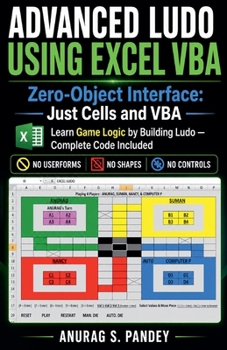
Advanced Ludo with Excel VBA Code Learn How to Build a Fully Functional Ludo Game from Scratch Using Excel VBA

Build a Fully Functional Ludo Game in Microsoft Excel Using VBA
Have you ever wondered whether you can create a complete, playable Ludo game directly inside Microsoft Excel?
This book provides 1,800+ lines of VBA code and straightforward instructions for creating a fully functional Ludo game in an Excel worksheet.
There is no need to manually draw the board or create the game interface. Copy the provided VBA code into the Excel VBA Code Editor, run the macro, and the Ludo board, layout, and game controls are automatically generated in the worksheet.
What You Can Create
The completed game includes:
Human vs. Human gameplayHuman vs. Computer gameplayComputer vs. Computer gameplayRule-based computer-player logicManual and automatic dice controlsMultiple players and Ludo piecesPiece selection and movementReset and restart controlsComplete game and turn logicAn interactive Ludo board generated directly by VBAA Zero-Object Interface
One of the distinctive features of this Ludo project is its zero-object interface.
The game does not require you to manually create Excel shapes, form controls, buttons, or other graphical objects to build the board and interface.
Instead, VBA generates the game directly in the Excel worksheet, including the board layout and controls.
This makes the project an interesting example of how VBA can transform a standard worksheet into an interactive game.
Learn From a Complete VBA Project
The book isn't just a collection of code. The complete project gives you an opportunity to explore how VBA can be used to implement game mechanics and programming logic.
You can examine and experiment with:
VBA programmingGame and turn logicDice and movement rulesPlayer and piece managementComputer-player decision logicWorksheet formatting through VBAInteractive controlsProgramming logic used to manage a playable board gameComplete Code Included
The book includes 1,800+ lines of VBA code used to create the Ludo game.
The basic process is simple:
Copy the code → Paste it into the VBA Code Editor → Run the macro → Play the generated Ludo game.
After creating the game, you can explore the code, experiment with its logic, and make your own modifications.
Who Is This Book For?
This practical VBA project can be useful for:
Excel VBA learnersExcel users interested in programmingBeginners looking for a hands-on VBA projectProgrammers interested in game developmentStudents exploring programming logicAnyone interested in creating a Ludo game in ExcelIf you want to explore what is possible with Excel VBA beyond traditional spreadsheets, this project gives you a practical way to build, examine, and play a complete Ludo game inside Excel.
Build the game. Explore the code. Understand the logic. Play Ludo-all inside Microsoft Excel.
Customer Reviews
ThriftBooks ® and the ThriftBooks ® logo are registered trademarks of Thrift Books Global, LLC
